Smart Video & Live Stream Automation

Your Content. Scheduled Automatically.

Schedule videos and automate pre-recorded live streams on YouTube — all from one easy-to-use cloud platform.
No credit card required 2-minute setup Free plan included
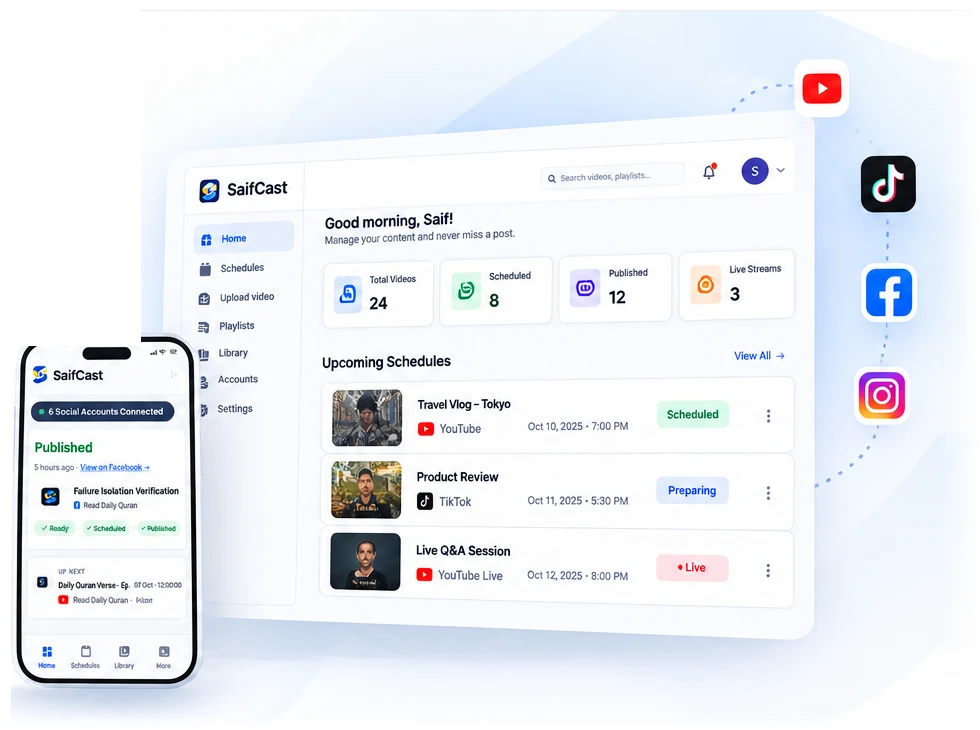
SaifCast Dual Device Dashboard Showcase

Schedule in Advance

Plan your content for the perfect time.

Auto Publishing

Let SaifCast handle the rest automatically.

Cloud Powered

Runs smoothly in the cloud, 24/7.

Cloud Automation

Reliable hands-off publishing in the cloud.

Supported Platforms

Stream & Schedule on Your Favorite Platforms

YouTube live & publishing available now; Facebook, Instagram, TikTok coming soon.

YouTube ● Live + Videos
TikTok Coming Soon
Facebook Coming Soon
Instagram Coming Soon
More Platforms Coming Soon
How It Works

Simple 3 Steps to Go Live or Schedule

Get started in minutes. No technical skills required.

01

Connect Your Channel

Connect your YouTube channel in seconds with official OAuth. Your access tokens are encrypted and secure.

02

Upload & Configure

Upload your video to your cloud media library. Set title variables like {episode}, custom tags, description and schedule time.

03

Sit Back & Automate

SaifCast's high-speed cloud engine publishes or streams your videos on time — even when your computer is completely turned off.

Live Streaming

Pre-Recorded Live Streaming on YouTube

Broadcast your videos live without keeping your computer on. SaifCast streams your pre-recorded content to YouTube with complete cloud reliability.

✓Cloud live streaming with zero load on your computer
✓Loop mode, sequential playlists, and scheduled future broadcasts
✓24/7 non-stop streams: included in the Enterprise live plans, and available as an add-on on other live plans
✓Continuous stream monitoring with automatic reconnection
Explore Live Streaming →
LIVE ● YouTube Live Active
Cloud Stream Active
● YouTube ● Facebook (Soon) ● TikTok (Soon)
Video Scheduling
STEP 01 ——

Plan, Upload & Schedule Your Videos

Automate your YouTube upload schedule weeks in advance. SaifCast handles the exact upload time, metadata, custom thumbnails, and privacy settings.

✓Daily, weekly, and custom recurrence intervals
✓Dynamic title variables: {episode}, {date}, {week}
✓Playlist scheduling cycling sequentially through videos
✓Advance YouTube announcement events for reminders
Start Scheduling Now →
SaifCast Video Upload & Scheduling Showcase
Schedule Timeline

Plan Your Content. Stay Consistent.

Schedule your videos weeks or months in advance. Keep your audience engaged across every channel without daily manual uploads.

✓Visual schedule timeline with upcoming queue view
✓Schedule ahead with dates and recurring times (depends on your plan — see Pricing)
✓Full upload history with detailed error logs & one-click retry
View All Features
Upcoming Schedule
October 2026
Mon
12
Video Upload
Tue
13
Wed
14
Live Stream
Thu
15
Fri
16
Episode #42
YouTube Live Streaming
STEP 03 ——

Go Live Automatically with YouTube Live

Schedule your YouTube live streams, set the start time, configure broadcast quality, and let SaifCast's cloud engine stream automatically.

✓Loop any stored video continuously as a live broadcast
✓Sequential playlist playback for multi-part live broadcasts
✓Concurrent live streams (depends on your plan — see Pricing)
Start Live Stream →
SaifCast YouTube Live Streaming Showcase
Social Accounts
STEP 04 ——

Manage Your Channels From One Place

Manage all your connected channels from a single dashboard. Connect multiple YouTube channels and switch between them effortlessly.

✓Connect multiple YouTube channels (depends on your plan — see Pricing)
✓One-click channel connection with secure permissions
✓Upcoming platform support for TikTok, Facebook & Instagram (coming soon)
Connect Channels →
SaifCast Channel Management Showcase
Cloud Media Library
STEP 05 ——

Content Library & Smart Scheduling Tools

Store your high-resolution videos and custom thumbnails securely in the cloud. Reuse media across unlimited schedules without re-uploading.

✓Cloud media storage included with every plan (depends on your plan — see Pricing)
✓Fast cloud playback and smooth automated scheduling
✓Private and secure access to your media files
Compare Storage Plans →
SaifCast Bento Grid & Media Library Showcase
Your Google Data

One permission. Nothing else.

When you connect a channel, SaifCast asks Google for a single permission: to upload videos to it. That is all it can do.

SaifCast uses YouTube API Services. By connecting your channel you also agree to the YouTube Terms of Service. SaifCast adheres to the Google API Services User Data Policy.

✕

Never reads your analytics, comments or subscribers

It has no permission to.

✕

Never sells or shares your data, or uses it for ads

Zero advertising or data trading.

🛡

Remove access any time

In SaifCast, or at myaccount.google.com/permissions.

Transparent Creator Pricing · No Setup Fees

Plans for Every Creator

Start free with watermark or upgrade for full HD, multiple channels and cloud storage.

Frequently Asked Questions

Frequently Asked Questions

Answers to common questions about video scheduling and live streaming.

SaifCast is a powerful content scheduling and live streaming platform that helps you manage, schedule, and publish your videos across multiple platforms automatically from a single cloud dashboard.
No! Once a schedule or live stream is set, SaifCast runs everything in the cloud 24/7. Your computer, phone, and home internet can be completely turned off.
No. SaifCast only uploads content to YouTube. It never deletes videos, playlists, or broadcasts from your YouTube channel.
Currently SaifCast publishes and streams to YouTube. Support for Facebook, Instagram, and TikTok is in active development and coming soon.
SaifCast Frequently Asked Questions Preview
Cloud Automation

Ready to Automate Your Content?

Join creators who schedule and stream effortlessly with SaifCast.

Start Free Today →